Soda PDF
Fully-featured Adobe Acrobat alternative
Soda PDF is an application that enables users view, create, and edit Portable Document Format (PDF) files. The software was originally developed by LULU Software (now Avanquest) in 2010, based in Montreal, Canada.

Context
Soda PDF was initially only offered as a desktop program for users to purchase and install on their systems. Not long after, the company switched to a SAAS model. “Service pages” offering an easy and convenient way to complete popular PDF-related functions were added to the website, serving as landers for paid traffic. A limited online editor was also introduced, with an UI based on the desktop program.
Interface-wise, early version of Soda PDF mimicked the feel of the Microsoft Office of the time. Then, with version 12, Soda PDF was redesigned to have its own distinct feel. Unfortunately, with the lack of an accompanying design system and many new features being added over time, inconsistencies in the UI started to appear.

Soda 10

Soda 12
I joined the Soda PDF product team at the time when version 14 was being developed. My mandate was to help make the user experience more coherent by doing minor tweaks to some of the flows, wording and visual presentation.

Soda 14
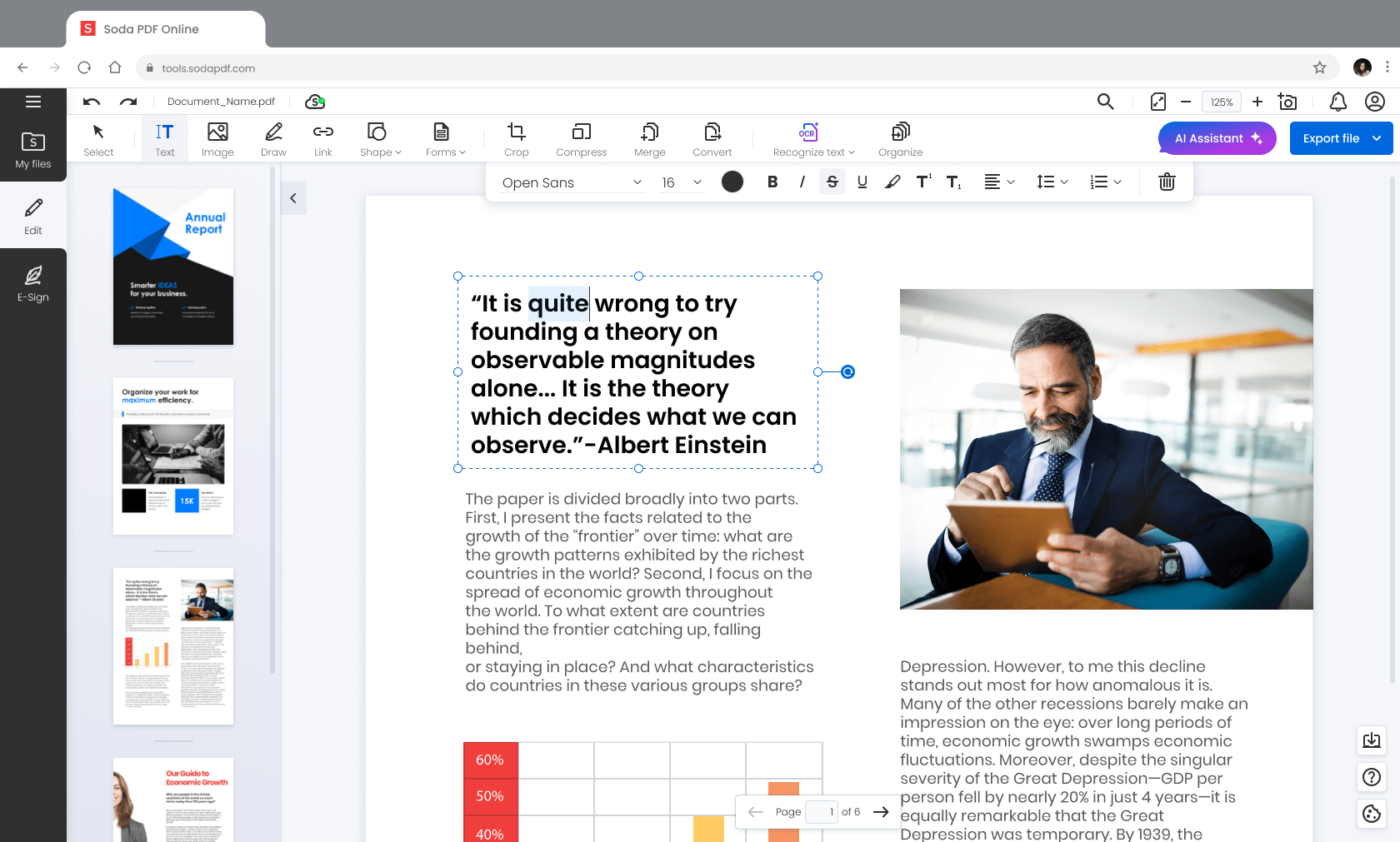
Soda Online
After the successful lunch of Soda 14, fresh user feedback started coming in. The company developed a clear roadmap for major upcoming features. The plan was to shift Soda PDF from a primarily desktop application, to a fully featured online editor that would work seamlessly across devices.
We needed to create a new, online-first vision of Soda PDF. That version would initially be released only with the main, most commonly used PDF-related features. The reminder of the old functions, as well as the planned new ones, would be prioritized and then deployed as development time allowed. When feature parity was reached with the desktop application, the online variant would be also turned into a replacement for the standalone desktop version of the software.
I had the pleasure to be given the responsibility to design Soda Online.
Challenges
- the new version of the app needed to seamlessly bridge the desktop, mobile and web experience
- we needed to stay sufficiently consistent with the mental model existing users had
- the lack of precise feature usage statistics due to broken in-app tracking was a considerable handicap
- the immense amount of features in Soda PDF added a lot of complexity to the project
- the public perception of Soda PDF needed to be improved, in particular how it is reflected on Trustpilot
My role
I started by immersing myself in the software, using it until I was familiar with its every aspect. During that process I quizzed more senior colleagues about some of the more obscure functionality, how and why we came to have it. My next step was to build an accurate picture of how the world perceived the app. I proceeded with aggregating data from online reviews and rating sites like Trustpilot and G2. I interviewed members of our support department about their interactions with our users, and examined support tickets.
I then tested competing offering from Adobe, Wondershare, Nitro, Foxit and others, and looked at the feedback they were receiving online. I spoke with team members about how they saw the differences between us and the competition - what they thought we did better and where we were behind.
My next step was to conduct a card sort with our internal cross-department test group, to see how we could improve the information architecture in the app. In addition to sorting the features into groups according to how they thought the features belonged, I asked them to also mark which features they used the most, and which, if any, they hadn't realized we offered.
Armed with that precious information, I could start work on the design. Here are some of the highlights.
Upgrading and unifying the layout
Due to its iterative nature and lack of design system at the time, Soda PDF had the tendency to be somewhat inconsistent in where some tools were located and where and how the menus they opened would appeared. Based on the accumulated feedback and the long time vision for the product, I set to create an intuitive layout that allowed for growth and integration with the Avanquest ecosystem.
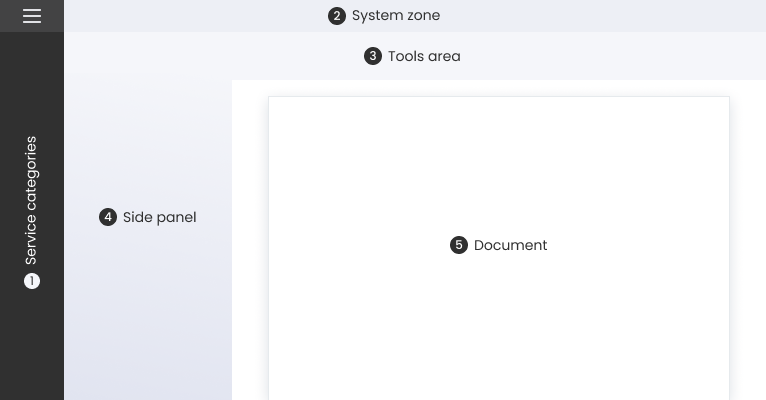
The leftmost side of the screen became reserved for major service categories.
The "system zone" at the top would now be home to account, search and other functions that carried across from service to service.
The "tools area" and "side panel" zones would house elements that changed the most depending on the task the user was preforming.
This, together with the more airy direction of the UI's redesign that aimed to turn the user's document into the real hero, made for a more consistent and pleasing experience.
Making features easier to find
Over the years, Soda PDF had steadily accumulated over 120 features, with quite a few of them being niche functionality requested by specific clients. That had made parts of the interface somewhat unwieldy, resulting in a somewhat overwhelming experience for new users.
Adding a sidebar allowed us to bring out and highlight major services like electronic signatures, cloud storage and translation. It also provided a suitable estate for future PDF-related services and cross promotion of the Avanquest ecosystem. Niche editing features that were previously attached to other categories were grouped together into a new “specialty” category.
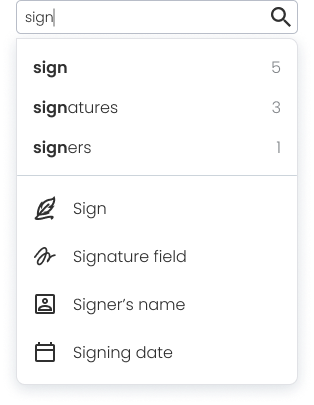
To help the new user experience, in addition to a new onboarding and updated knowledge base articles, a “feature finding” capability was added to the app’s search function.
PDF on mobile
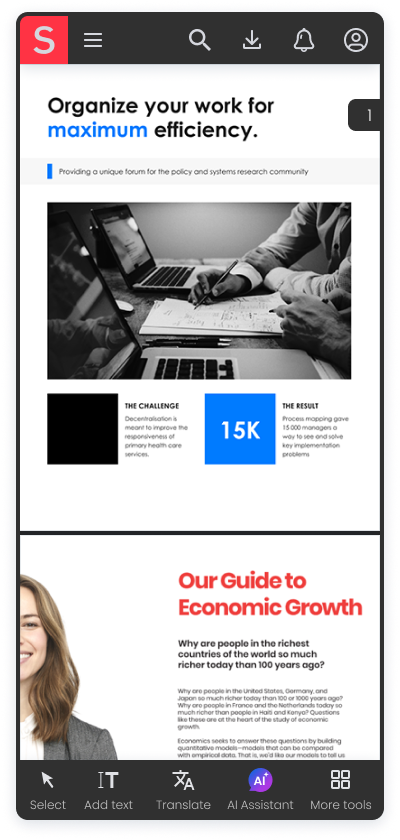
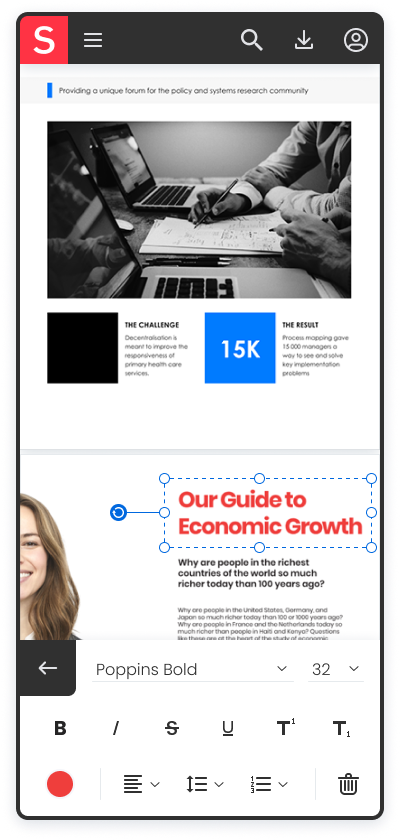
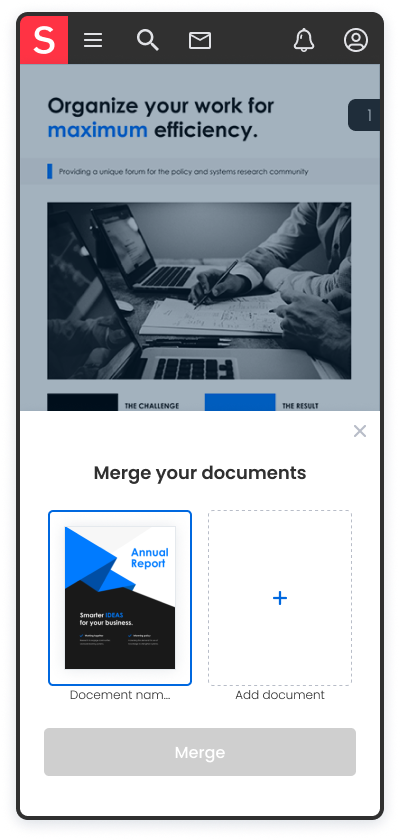
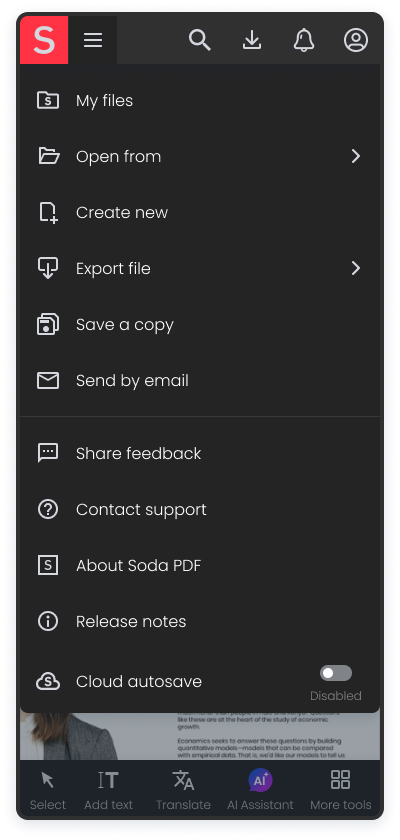
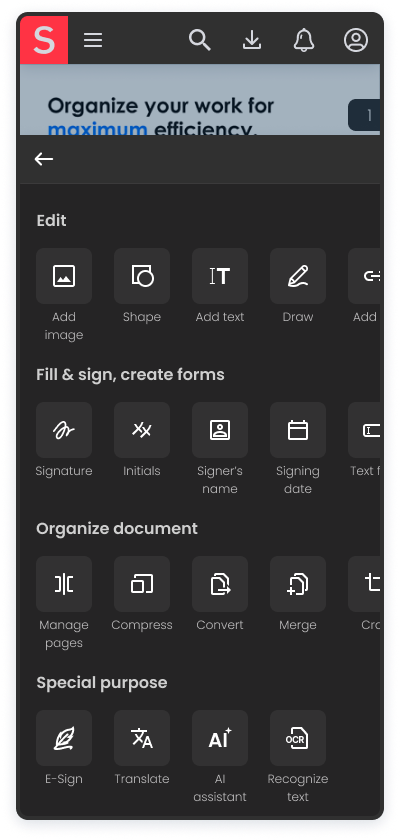
With Soda Online, the team got the green light to give the app’s mobile experience the long overdue attention it deserved.
That meant identifying the differences in how users use PDF on desktop and mobile and making sure the interface accommodated their needs. On a simplified level, desktop skewed towards authoring, while mobile tented to be more centered on viewing and filling documents. Of course, the mobile version still needed to provide a well-rounded editing experience. It also had to do a better job of using touch controls.

Combining features
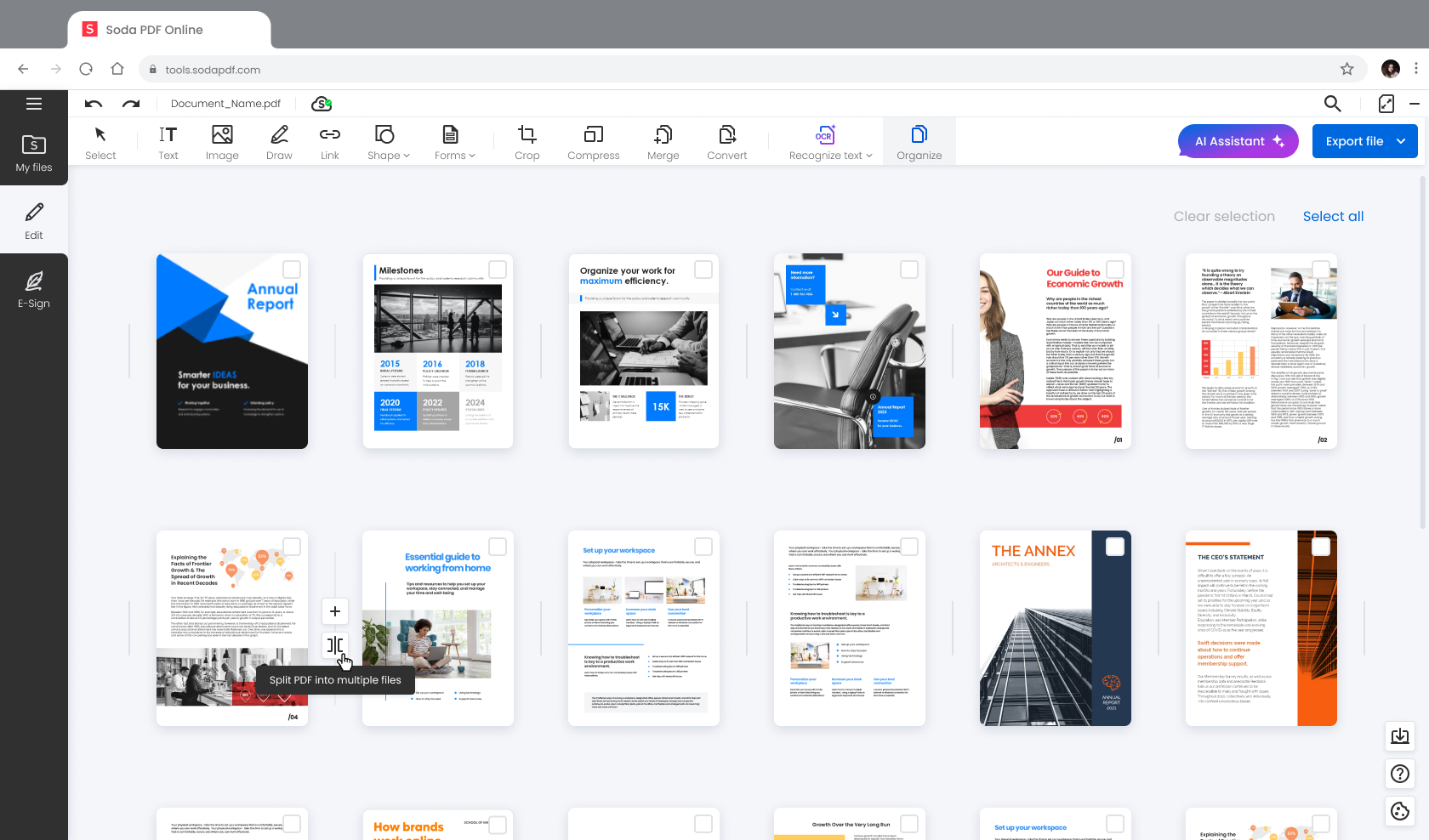
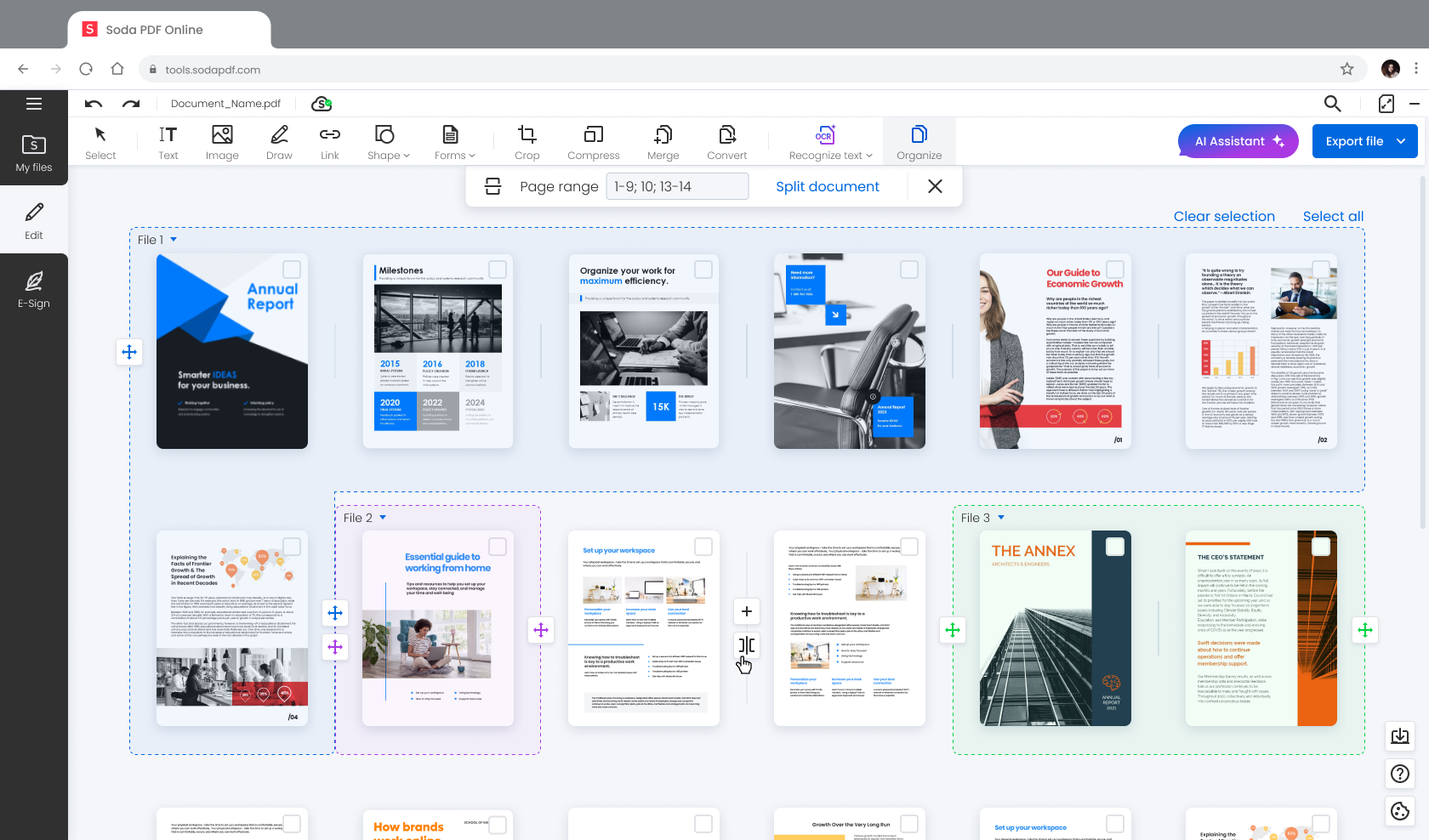
In the previous version of Soda, a lot of document organization operations would be handled through pop-up windows where users would have to enter page ranges. Those modals would cover the document view, making it necessary that users either which pages they wanted to split, extracts, etc. This made for an inconvenient experience, especially when working with larger documents. To manage this, users ended up writing down the page numbers beforehand, or opening another instance of the document in a separate web-browser window.
To improve this part of the experience, I merged the insert, extract, and move pages features, as well as the merge and split documents features into a single cohesive interface. The option to manually enter page numbers was still available, but users could now finish the desired task conveniently through a visual representation of their document.
Takeaways
Coming soon...
Impact of the redesign
Three months after the release of Soda Online, the team was happy to observe
41%
less UI-related complaints received by the support department
4.2
rating on TrustPilot, an increase from the previous 3.3
18%
improvement in user conversion from trial to paid accounts
Summary
During my time with Avanquest I had the pleasure to:
- Optimize user acquisition and retention; from landing page design, through in-app experience, to retention and license renewal
- Improve the SodaPDF.com website and service pages experience on desktop and mobile
- Advocate for greater use of UX practices within the company
- Collaborate with an international team spread across numerous timezones
- Mentor junior designers
- Update the visuals and flow of the Soda PDF Chrome extension
- Conceptualize and design a user management panel for our B2B clients
- Design the next iteration of the Soda PDF app
- Help set up and contribute to the Soda PDF design system
- Redesign the E-Sign service